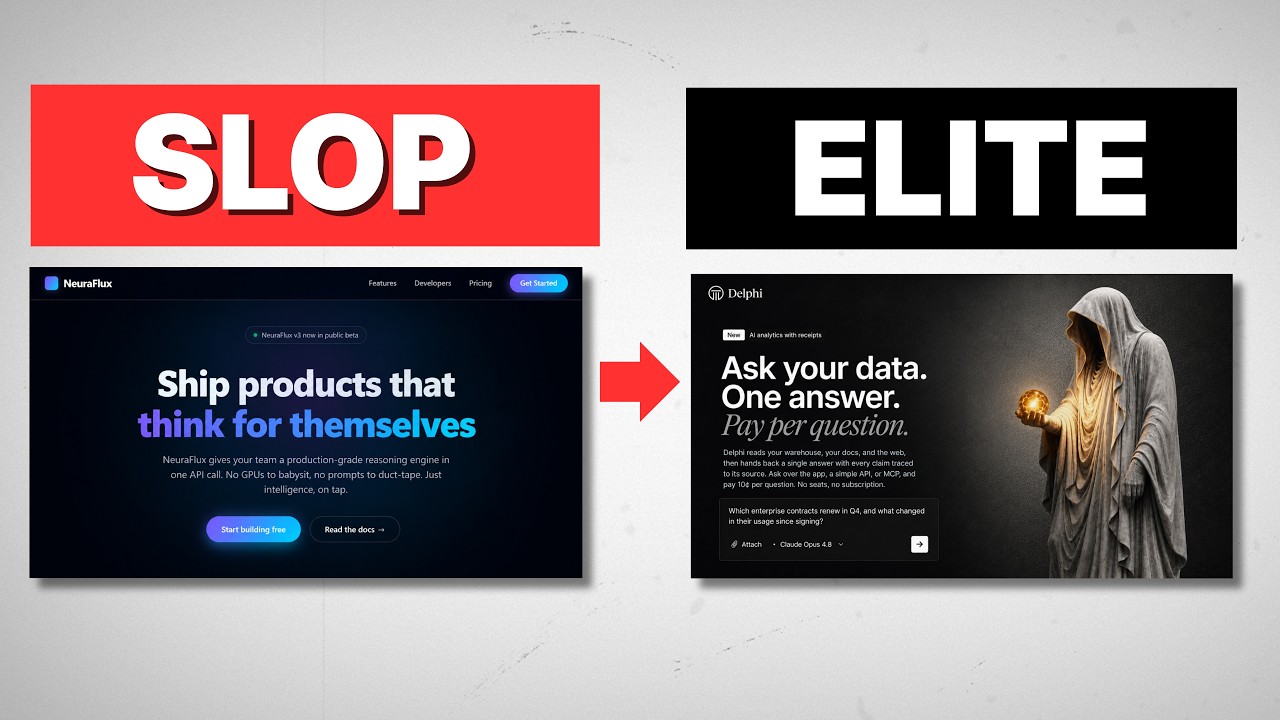
How to Build a Premium AI Agency Website for Free (No "AI Slop")
You can build a premium agency website for free using Gemini 3, GitHub, and Vercel—but only if you use a specific system prompt to avoid the typical "AI slop" design. I’ve tested this against Lovable and ChatGPT, and the difference is night and day. Here is the exact tech stack and prompt strategy to go from zero to a deployed sales funnel in about 30 minutes.
Most people get this wrong. They go into ChatGPT or Lovable, type "make me a website for my AI agency," and they get the same garbage results: a white background, a cheap purple-blue gradient, generic "Inter" font, and those terrible, flat icons. That screams amateur.
We are going to fix that. We’re going to build a site that looks like a human designer spent weeks on it, host it for free, and hook it up to a CRM. Here is the thing: you don't need to be a coder to do this, but you do need to stop treating the AI like a magic wand and start treating it like a junior developer.
Why Do Most AI Websites Look Like "Slop"?
If you use a basic prompt in ChatGPT or Lovable, you get the "AI uniform." It’s that generic SaaS look that everyone recognizes instantly.
I ran a test. I gave the exact same prompt—"Build me a website for my AI agency"—to Gemini without instructions, to Lovable, and to ChatGPT. They all produced the same result: cheap icons, boring layout, and that overuse of the color purple.
Why does this happen? The models are trained on averages. The "average" website is mediocre.
The reason my Gemini result looked premium—with a bento-box layout, distinct typography, and subtle lighting effects—wasn't just because I used Gemini (though Gemini 3 is brilliant for UI). It was because I used a specific system prompt.
The Secret Sauce: The System Prompt
The most critical step in this entire process is setting the operational parameters before you ask for the website. A system prompt is just an internal set of instructions that prevents the AI from defaulting to generic design patterns.
Here is what your system prompt needs to cover to get a premium result:
- Design Analysis: Tell the AI to determine the archetype. Is this SaaS? Is it corporate? It needs to know the vibe before it writes code.
- Typography Rules: Explicitly ban fonts like "Inter" or "Roboto." Tell it to import distinctive fonts from Google Fonts. If you don't know which ones, go to fonts.google.com, find a "Mood," and tell the AI to use that specific family.
- Color Constraints: Forbid the standard gradients. Ask for modern, ultra-premium color palettes.
- Spacing and Layout: Ask for a "bento box" format. You want variable sizing and spacing that makes elements jump off the page.
- Tactile Feedback: Request hover states and motion. When a mouse moves over a box, it should glow or lift. This is what separates a static PDF-looking site from a modern web app.
When you paste these instructions into Gemini before asking for the website, the output changes from a generic template to something you can actually sell.
How to Deploy Your Site for Free (The GitHub + Vercel Stack)
Once Gemini gives you the code (usually an index.html file), most people get stuck. They have the text, but they don't have a website. We are going to set up a professional CI/CD pipeline. It sounds technical, but it takes about 5 minutes.
Step 1: Push to GitHub
Click the "Code" button in Gemini and copy the HTML.
- Go to GitHub.com and create a free account.
- Click "New Repository."
- Name it (e.g., "agency-site-test") and set it to Private.
- Click "Create a new file," name it
index.html, paste your code, and hit "Commit changes."
Now your code lives in a repository, not just a chat window.
Step 2: Host on Vercel
We use Vercel because it connects directly to GitHub.
- Go to Vercel.com and create an account (log in with your GitHub credentials).
- Click "Add New Project."
- You will see your GitHub repository listed. Click Import.
- Click Deploy.
That’s it. Vercel will give you a live URL. You now have a deployed website.
This is where it gets interesting: Because we linked Vercel to GitHub, any time you edit that index.html file in GitHub and hit "Commit," Vercel automatically updates your live website. You don't need to re-upload servers or mess with FTP.
Turning a Static Page into a Sales Funnel
A website that doesn't capture leads is useless. We’re going to add a Tally form. Tally is the best free form builder because it’s clean and highly customizable.
- Go to Tally.so and create a "Lead Generation" form.
- The Design Trick: The default Tally form won't match your premium website. Take a screenshot of your Tally settings or copy the existing CSS. Go back to Gemini and say: "I am adding a Tally form. Here are the fields. Give me the specific hex codes and font settings to make this form match my website exactly."
- Gemini will give you the precise color values.
- Update Tally with those colors.
- Grab the Code Embed from Tally.
Back in GitHub, edit your index.html and paste the Tally embed code where you want the button to trigger. Commit the changes. Vercel updates the site. Now, when a client clicks "Start Audit," a beautiful, brand-matched form pops up.
Automating the Follow-Up (Speed to Lead)
If you really want to run an agency, getting an email notification isn't enough. You need speed to lead. We can use n8n (a workflow automation tool) to handle this.
I use a simple 4-node workflow:
- Tally Trigger: Activates when a form is submitted.
- Google Sheets Node: Logs the lead's data (Name, Role, Company) into a CRM.
- LLM Node: Feeds the lead interaction to an AI model with a system prompt like "Draft a personalized response to this potential client based on their request."
- Gmail Node: Creates a Draft email in my inbox.
I prefer creating a draft rather than auto-sending. It lets me review the AI's response before hitting send, ensuring I don't sound like a robot.
The Reality Check: What Are the Limitations?
Look, I want to be direct about what this is and what it isn't.
This is a 90% solution. It works incredibly well for landing pages, one-pagers, and lead funnels. It costs $0 to host (until you buy a custom domain) and looks better than most $5,000 WordPress sites.
However, this approach is "bare metal." You are effectively managing a single HTML file. If you want a complex, 50-page application with user login, databases, and dynamic content, this method breaks down. For that, you need to leave the Gemini chat window and start working in a proper IDE like Cursor or VS Code.
But for establishing authority, showing testimonials, and booking calls? This executes the job perfectly.
FAQ
Is this method actually free?
Yes. GitHub, Vercel, and Gemini (flash models) all have generous free tiers that are more than enough for a standard agency landing page. The only thing you strictly need to pay for is a custom domain name (e.g., youragency.com) if you don't want the .vercel.app extension.
Why use Gemini over ChatGPT for this?
In my testing, Gemini 3 adheres to design system prompts significantly better than GPT-4 or Claude 3.5 Sonnet when generating raw HTML/CSS. It has a better "intuition" for modern UI trends like glassmorphism and bento grids without needing as much hand-holding.
Do I need to know how to code to use GitHub?
No. You are using GitHub as a storage drive. If you can copy text from Gemini and paste it into a text box in GitHub, you can do this. The "Commit Changes" button is effectively just a "Save" button.
Use this stack. It’s free, it’s fast, and it avoids the AI slop that makes your agency look cheap. If you want the exact system prompts and automation templates I used in this workflow, grab them in the free Chase AI community.