Claude Projects: Cloud Multi-Agent Orchestration
Claude projects turns Claude into a cloud project manager that runs a fleet of full Claude sessions 24/7. Here's how to get access, when to use it, and how it beats sub-agents.
On this page
Claude projects is a beta feature that turns Claude into a project manager running a fleet of full Claude Code sessions in Anthropic's cloud — 24/7, sharing memory and context, paid for out of your Max plan instead of API costs. You talk to one orchestrator, and it spins up and manages every worker underneath it. I got off the waitlist in under 24 hours and put it to work building a real project. Here's exactly how it works, when it's worth using, and how to set it up yourself.
What Is Claude Projects?
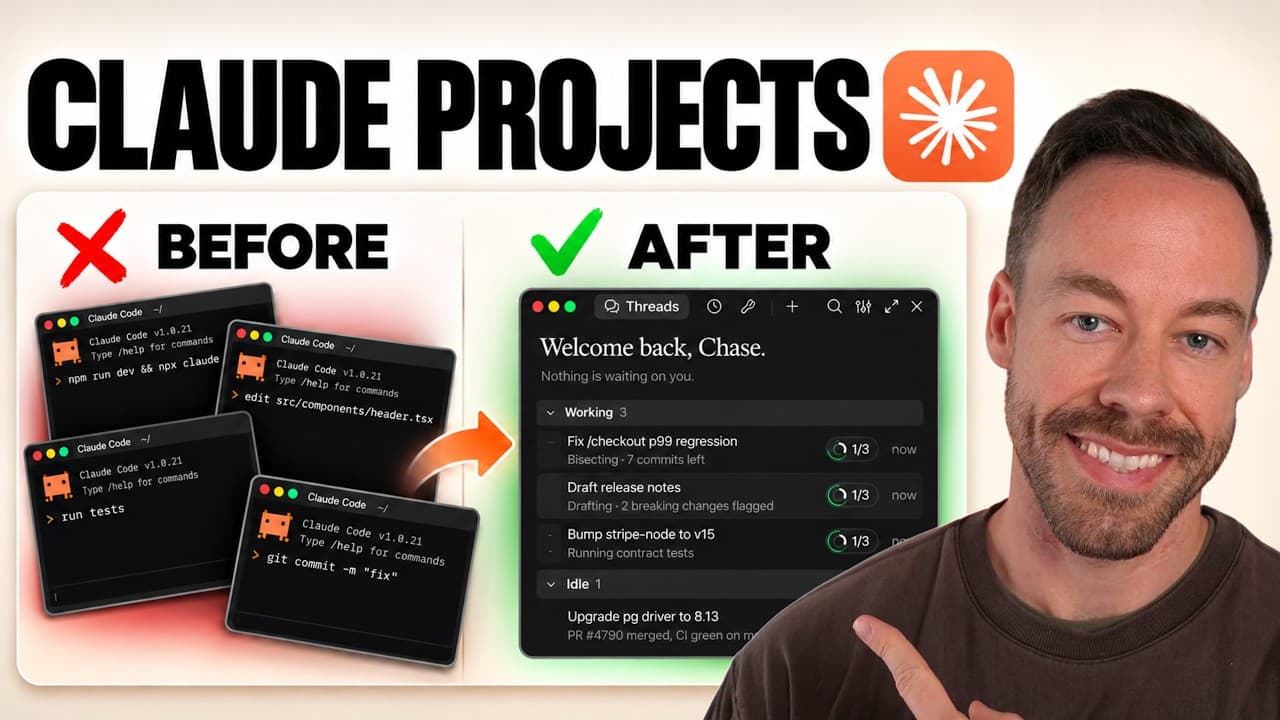
Claude projects (it shows up as "Projects beta" in the Claude desktop app) is multi-agent orchestration that lives in the cloud. The big shift is who's in charge. Normally, when you're in Claude Code — desktop app or terminal — you manage everything: all the terminals, all the agents, and the painful job of keeping them on the same page.
With projects, Claude is the project manager. You talk to a single orchestrator, and it deals out the work, coordinates the threads, and keeps everyone in sync. You stop babysitting sessions and start giving orders to one agent.
Two things make this different from the "projects" Claude had years ago in the chat app. Those were basically folders for grouping conversations. This is not that. This runs in Anthropic's cloud and is built entirely around running multiple agents at once.
And don't confuse it with the old cloud options, either. In the past, pushing Anthropic work to the cloud meant paying API costs. Claude projects pulls from your Max plan usage — not the API. You get the advantages of the cloud with the economics of your subscription.
How Is Claude Projects Different From Sub-Agents?
This is the question everyone asks, because on the surface it sounds like one session spawning sub-agents. It isn't. The difference comes down to persistence and who manages the work.
When you spawn a sub-agent in a normal Claude Code session, it does its task, writes a summary, and sends that summary back to your main session — filling up the context of that one window. The sub-agent itself disappears.
In a project, the workers the orchestrator creates aren't really sub-agents at all. They're full Claude sessions with their own context windows, and they're persistent — they never shut off. That changes what you can do with them:
- They own their own pull requests. Each worker commits its own slice of the build.
- You can message them directly. Go into worker one or worker two and steer it like you'd talk to the orchestrator.
- They maintain context the whole time. No summary-and-die — the memory stays live.
The cleanest way to think about it: sessions with sub-agents are best for one task at a time. Projects are best for a stream of work you don't want to babysit.
When Should You Use Claude Projects (and When Shouldn't You)?
This feature is powerful but genuinely niche. Using it for the wrong job just burns usage. Here's the honest breakdown.
Don't use Claude projects when:
- It's a quick task. If you can knock it out in a single chat session, you don't need orchestration.
- The work has to happen on your machine. If it's manipulating files and folders that literally live on your computer — not in a GitHub repo — projects isn't built for it. There's a caveat: you can spawn sessions that run locally (more on that below), but that's not what it's designed around.
- You need team or enterprise support. It's not on team or enterprise plans yet.
Do use Claude projects when:
- You have an area you'll keep feeding. An ongoing project you return to and add complexity to over time.
- It's a complicated build you can split into parts. Each worker owns a section of the task.
- It's long-running and cloud-friendly. Ideally connected to a GitHub repo.
Here's a signal that tells you this is real: Boris Cherny, the creator of Claude Code, said he stopped managing sessions in the Claude Code desktop app and now uses projects as his backlog — a dumping ground for any idea or task that pops into his head. Because the orchestrator and all its workers share memory and context, that dumping ground stays coherent.
How Do You Get Access to Claude Projects?
Right now, access is gated behind a waitlist application. You submit your name on the application page (the link is in the video description), and you're in the queue.
When this first launched a couple months ago, the waitlist was hard to clear. That's changed. Now, if you put your name in, you'll likely get access within 24 hours — mine was less than a day — and a couple weeks ago they let everybody off the waitlist. There's basically no excuse not to get it running.
Once you're in, "Projects beta" appears in the top left of your Claude desktop app. If you've got ancient chat-era projects sitting in there, it'll ask whether you want to delete or archive them — just archive everything to start from a clean slate.
How Do You Set Up a Claude Project?
Click New project, give it a name, and you're running. Everything else is optional at creation:
- Name it. For the demo I used "project demo."
- Set a goal (optional). An overarching outcome the project is working toward. You can leave it blank and edit it later.
- Add context (optional). Documentation or files you want every thread to start with.
- Hit Create project.
Then open the gear icon in the top right for project settings. This is where the important choices live, across a few tabs.
Models: Coordinator vs. Thread
The two settings that matter are the coordinator model and the thread model. Threads are the workers the coordinator spins up (a thread can even contain multiple workers — just picture coordinator on top, threads/workers underneath).
- Coordinator model defaults to Opus 5.5 on low effort. That sounds too low until you remember the coordinator isn't doing the work — it's just handing it out. Low is fine. Bump it to medium or high only if coordination gets sloppy.
- Thread model defaults to Opus 5.5 on medium, which is plenty. You can drop it to Sonnet if you want to save usage.
Watch your usage here. Projects can burn through tokens fast — similar to dynamic workflows, you could have 5, 10, or 15 threads all working at once, 24/7. There's also an auto-continue when usage limits reset option: burn through 100%, and when your weekly reset hits, the project picks up where it left off. From this tab you can also pause, restart Claude, or archive the project.
Memory: Project Instructions + Auto Memory
Project instructions work like CLAUDE.md or an agents file — they get read into every single thread. That makes them powerful and easy to abuse. Treat it like agents.md: less is more. If there's one specific thing you want done the same way in every thread, put it here. If you're not sure, leave it blank.
There's also auto memory, which behaves like auto memory in Claude Code — a scratch pad where Claude leaves itself sticky notes about things worth remembering as you work.
Environment: Repo, Cloud, and Local Access
This tab is what makes the workers functional:
- Project repository. All your workers live in the cloud and need a GitHub repo to communicate and send PRs. Select one, or just ask a normal Claude Code session to create a repo for you.
- Cloud environment. Leave it on the default and it uses Anthropic's standard environment. Or add your own, name it, set network access from none to full, and upload secrets and environment variables — which you'll need if your project uses API keys.
- Local settings. Flip "Let Claude use your device" to yes and designate pre-approved folders if a worker needs to touch your actual machine. By default everything stays in the cloud.
- Debug access. Got two projects? You can let project B inspect project A to help debug — a fresh set of eyes when one project's context gets poisoned and it can't fix itself. Niche, but good to know it's there.
What Does Claude Projects Actually Build? (A Real Demo)
I pointed a project at a real build: AI Creator Radar — a tool that scrapes trending AI news off X, checks what's already been covered on YouTube, finds the gaps, and turns it all into a dashboard suggesting video, short, carousel, and X-post ideas.
I gave the orchestrator the prompt and the end state I wanted, then let it run. It split into five parallel threads, each owning a slice of the pie: one on dashboard and hosting, one on the X scanner, one on YouTube coverage, one on content packs, and one on Claude Code news.
After about 25 minutes, the threads panel showed the status at a glance: two ready for review, three with blockers needing a decision or more info, and one idle. I could click into any thread to steer it directly, view threads from the orchestrator panel in the middle, or just handle everything by talking to the single orchestrator. The whole time, the workers were committing into my GitHub repo, with every thread's work showing up as pull requests.
Clearing Blockers and Going Local
Most blockers were about the cloud environment needing API keys. The fix: project settings → environments → add a cloud environment, set network access to full, add the key as a network secret, hit add. Then I told the coordinator, "I just updated the cloud environment with the YouTube key as a network secret," and it routed that to the right thread. Repeat for the rest.
The X scanner needed my logged-in account, so I told that session to run locally — it used the in-app browser inside the Claude desktop app with my own cookies, and it built a local scheduled routine in the folder I'd pre-approved. That's the local-escape-hatch in action: mostly cloud, selectively local when it has to be.
The Result
The dashboard it one-shot shows which stories are trending on X but have no YouTube coverage, and for each one, a content pack: what the video, short, carousel, and X post could look like. It surfaces per-story stats (posts per hour, views, clickable source posts), channel stats, Claude Code news, and a refresh log at the bottom.
Solid work for a first pass. But the dashboard isn't the real sell. The real sell is that it now lives in the cloud, I can reach it from anywhere, and all those threads keep sharing and maintaining context. I can feed it new information whenever I want, it runs even when my computer is off, and I keep adding complexity through one orchestrator.
Is Claude Projects Worth It?
If you need genuine 24/7 access to complicated, long-running work, yes. The value add is real: in the past, Anthropic's cloud options always drained from the API. Now it comes straight from your usage — and with Opus 5.5 being notably more token-efficient than something like Fable 5.1, a lot of us have usage to spare.
If that's not you — if your work is quick, local, or single-session — no problem, you don't need it. It's niche by design. But if you're someone who wants complicated projects always running, staying on usage, and managed by a single agent you can talk to from your phone, it's a great addition to Claude Code. The documentation (also linked in the video description) is extensive if you want to go deeper.
My honest advice: if nothing else, hop on the waitlist — you'll get access fast, and then you can decide for yourself.
Frequently Asked Questions
Does Claude projects cost extra on top of my plan?
No. Unlike past Anthropic cloud options that billed through the API, Claude projects pulls from your Max plan usage. The tradeoff is that running many threads 24/7 can burn through usage quickly, so keep an eye on your coordinator and thread model settings.
How is a project worker different from a Claude Code sub-agent?
A sub-agent runs one task, returns a summary, and disappears into your main session's context. A project worker is a full, persistent Claude session with its own context window — it owns its own pull requests, keeps its context live, and you can message it directly at any time.
Can Claude projects work on files on my local machine?
Yes, but it's not the default. Everything runs in the cloud unless you flip "Let Claude use your device" to yes and designate pre-approved folders. Projects are built for cloud and GitHub-based work — local access is an escape hatch, not the main use case.
What models does Claude projects use?
By default, the coordinator runs Opus 5.5 on low effort (it's only handing out work, so low is fine) and the threads run Opus 5.5 on medium. You can raise the coordinator's effort if coordination slips, or drop threads to Sonnet to save usage.
How long does the waitlist take now?
As of this writing, access typically comes within 24 hours of applying, and Anthropic recently cleared the entire waitlist. It was much harder to get in during the limited early release a couple months ago.
If you want to go deeper into multi-agent orchestration with Claude Code, join the free Chase AI community for templates, prompts, and live breakdowns. And if you're serious about building with AI, check out the paid community, Chase AI+, for hands-on guidance on how to make money with AI.
Topicsclaude-codeclaude-projectsmulti-agent-orchestrationai-agentscloud-aianthropic